RTC
接口说明
在需要硬时钟的使用场景下,设备支持内置添加RTC硬时钟电池。
备注
rtc电池默认出厂不安装
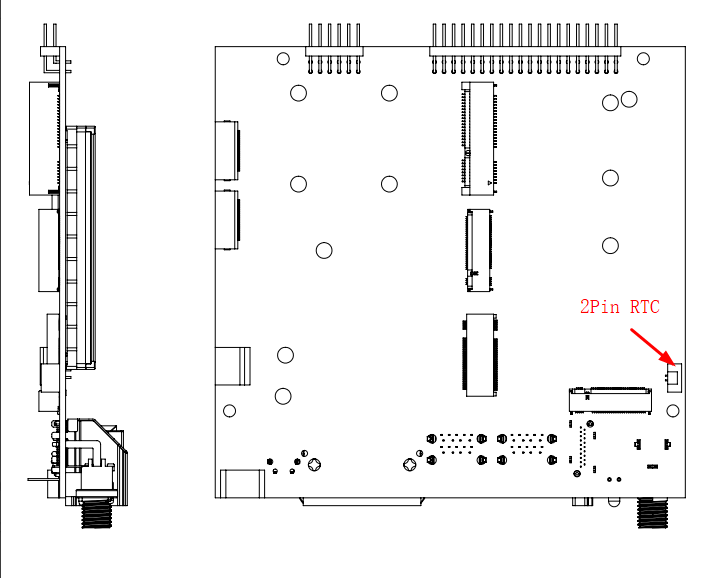
电气特性
1 x 3.3V MX1.25 2Pin RTC 供电接口
支持列表
3.3v RTC电池
配置步骤
在需要硬时钟的使用场景下,配置步骤如下
警告
当烧写为Jetpack5.x版本时,除了执行hwclock -w之外,还需要设置开机启动脚本,脚本内容见常见问题。
查看当前系统时间
将设备连接互联网后,设备内的时间同步协议NTP,会自动同步网络时间。 通过命令查看当前的系统时钟/时区等,并设置(自动获取时间等)为当前准确时间;
nvidia@ubuntu:~$ date
Wed 24 Jan 18:53:49 CST 2024
读取当前硬时钟的时间信息
root@ubuntu:/home/nvidia# hwclock -r
1970-01-01 08:23:01.576691+08:00

root@ubuntu:/home/nvidia# hwclock -v
hwclock from util-linux 2.34
System Time: 1713886828.916476
Trying to open: /dev/rtc0
Using the rtc interface to the clock.
Last drift adjustment done at 1713883781 seconds after 1969
Last calibration done at 1713883781 seconds after 1969
Hardware clock is on UTC time
Assuming hardware clock is kept in UTC time.
Waiting for clock tick...
...got clock tick
Time read from Hardware Clock: 2024/04/23 15:40:31
Hw clock time : 2024/04/23 15:40:31 = 1713886831 seconds since 1969
Time since last adjustment is 3050 seconds
Calculated Hardware Clock drift is 0.000000 seconds
2024-04-23 23:40:30.150567+08:00
将当前系统时间写入硬时钟
root@ubuntu:/home/nvidia# hwclock -w
root@ubuntu:/home/nvidia# hwclock -r
2024-01-24 18:55:25.714672+08:00
系统关机,等待一段时间后,重新开机检查当前系统时间是否准确
注意:
仅Jetpack5.x版本需要设置开机启动硬件rtc时间同步到系统时间:hwclock -s 加入/etc/rc.local
而Jetpack6.x版本系统支持自动开机后的rtc时间同步到系统时间,无需额外设置
常见说明
英伟达Orin系列AI模组共有两个时钟:rtc0和rtc1,在不同的Jetpack版本上,默认rtc指向不同:
rtc0:电池所在硬时钟;
rtc1:soc的内置硬时钟;
Jepack5.x的默认RTC设备的内核设备信息
root@tegra-ubuntu:/home/nvidia# ll /dev/rtc*
lrwxrwxrwx 1 root root      4 Sep  8  2022 /dev/rtc -> rtc1
crw------- 1 root root 250, 0 Sep  8  2022 /dev/rtc0
crw------- 1 root root 250, 1 Sep  8  2022 /dev/rtc1
Jepack6.x的默认RTC设备的内核设备信息
nvidia@tegra-ubuntu:~$ ll /dev/rtc*
lrwxrwxrwx 1 root root      4 Jan  1  1970 /dev/rtc -> rtc0
crw------- 1 root root 251, 0 Jan  1  1970 /dev/rtc0
crw------- 1 root root 251, 1 Nov 21  2023 /dev/rtc1
Jetpack5.x版本如何设置开机自动启动脚本rc.local
添加rc.local文件并赋予执行权限
touch /etc/rc.local
chmod +x /etc/rc.local
编辑文件内容和开机启动命令
vim /etc/rc.local
#!/bin/bash -e
#
# rc.local
#
# This script is executed at the end of each multiuser runlevel.
# Make sure that the script will "exit 0" on success or any other
# value on error.
#
# In order to enable or disable this script just change the execution
# bits.
#
# By default this script does nothing.

hwclock -s
重启rc-local服务
systemctl start rc-local.service
systemctl status rc-local.service